Door Hardware Submittals
Door Hardware Submittals, With Every Option Highlighted on the Cut Sheet
Type the part number, then ask for a submittal. Conversant finds each option of that part number on the manufacturer's own cut sheet, highlights it on its page, and packs the marked-up pages behind a cover sheet. You still review it. You just stop hunting.
Free in the pricebook. No login.
Why do submittals take so long?
Once the job is won, every hardware line needs product data the architect can check against the specification. For each line, someone has to:
- Find the manufacturer's current cut sheet for the series.
- Find every code of the part number on it: function, cylinder, lever, finish, often on different pages.
- Highlight each one by hand, page by page.
- Assemble the packet with a cover sheet, then do it again for the next line.
Example: a Schlage ND53 lockset, every option on its page
Typed
Schlage ND53PD RHO 626
As a hardware schedule writes it.
Priced as
ND53 P6 RHO 626 · $1,010.00
From the Schlage price book, effective May 29, 2026.
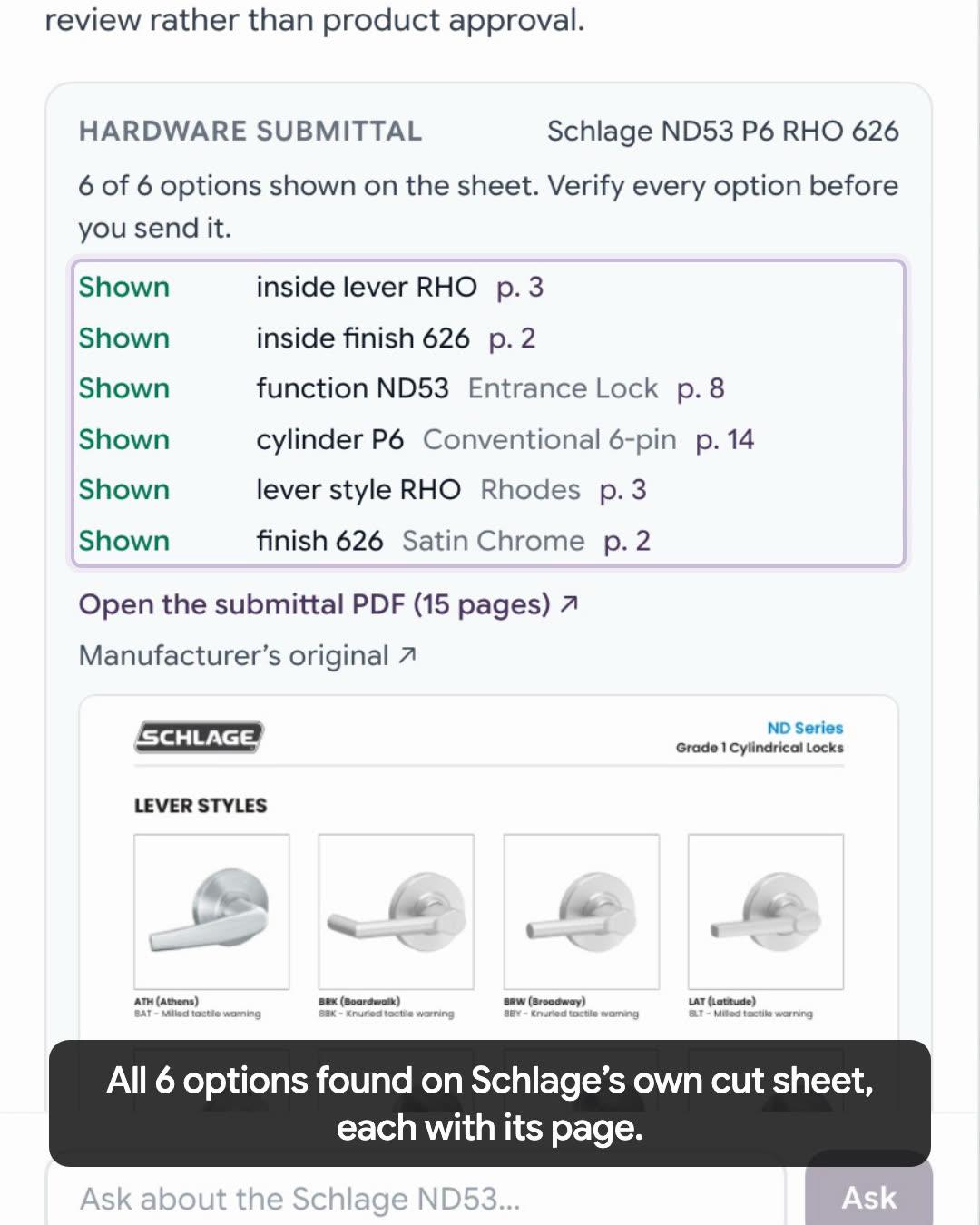
Asked for a submittal, the assistant reads Schlage's own cut sheet and reports 6 of 6 options shown, each with its page. The packet runs 15 pages: an 08 71 00 cover sheet, then the cut sheet, with every option highlighted where Schlage prints it.
| Option | Code | Meaning | On the cut sheet |
|---|---|---|---|
| Function | ND53 | Entrance lock | Shown p. 8 |
| Cylinder | P6 | Conventional 6-pin | Shown p. 14 |
| Lever style | RHO | Rhodes | Shown p. 3 |
| Finish | 626 | Satin chrome | Shown p. 2 |
| Inside lever | RHO | Rhodes | Shown p. 3 |
| Inside finish | 626 | Satin chrome | Shown p. 2 |
On page 3 the Rhodes lever is highlighted twice: its RHO label, and its row in the dimensions table.
Video transcript
- 0:00
- You won the job. Next comes the submittal: every option, found on the cut sheet and highlighted by hand. Now it's two steps.
- 0:04
- Step one: type your part number, and click Price this line.
- 0:09
- Messy is fine. It locks in the exact part, and prices it.
- 0:12
- Step two: click Ask about this part, and ask for a submittal.
- 0:15
- It finds all six options on Schlage's own cut sheet, each with its page. Then open the packet.
- 0:20
- Fifteen pages: a cover sheet, then the manufacturer's cut sheet.
- 0:23
- The entrance lock function, on page eight.
- 0:25
- The six-pin cylinder, page fourteen.
- 0:27
- The Rhodes lever, and its dimensions, page three.
- 0:30
- And the satin chrome finish, page two. You still review it. You just stop hunting.
- 0:34
- Price the line, then ask for the submittal. Free, no login, at conversant.ai/pricebook.
Need submittals for an entire hardware schedule? Start by extracting and organizing the hardware sets from your bid package.
What you get for each line
- The manufacturer's own cut sheet, not a retyped summary, with each option of the part number highlighted where it is printed.
- A card listing every option as Shown, Check or Not shown, with the page it is on.
- A PDF packet: a cover sheet under 08 71 00, then the marked-up manufacturer pages.
- If the manufacturer's sheet isn't on file, upload the one you have and it marks that up instead.
It is a starting point for the submittal, not an approval. The card ends by asking you to verify every option before you send it, and the architect still reviews the submittal against the specification.
Build a submittal for your own hardware
Submittals run in the Pricebook Intelligence assistant, starting from a priced line. The form at the bottom does it in one step. Starting in the pricebook itself, it takes four:
- 1
Enter your part number
Open the Conversant Pricebook and enter the line as written in the schedule. Messy is fine.
- 2
Price this line
The pricebook assembles the exact part number and prices it. Pick any option or finish it still needs.
- 3
Open the assistant
Select the Ask button under the product: “Ask about this part”, or “Ask about” followed by the product’s name.
- 4
Ask for a submittal
Choose “Prepare a hardware submittal for this configuration”, or type it. The card lists each option with its page; open the packet from there.
Door hardware submittal FAQs
What is a door hardware submittal?
The product data a contractor submits for approval under Section 08 71 00: the manufacturer's cut sheet for each hardware item, with the specified options identified, so the architect can check the product before it is ordered. Identifying the options usually means finding each code of the part number on the cut sheet and highlighting it by hand.
How does Conversant build a submittal?
Price the line in the pricebook so the exact part number is locked in, then ask the assistant for a submittal. It reads the manufacturer's cut sheet, finds each option of that part number on it, and highlights it. The card lists every option with the page it is on, and the packet is a PDF with a cover sheet followed by the marked-up manufacturer pages.
What if an option isn't on the cut sheet?
The card says so. Each option is marked Shown, Check or Not shown, with the page where it was found, so a reviewer sees at a glance what the sheet supports and what needs a second look. The card always ends by asking you to verify every option before you send it.
Which manufacturers are covered?
Any line the pricebook can price, as long as the manufacturer's cut sheet for that series is on file. When it isn't, the card says so and you can upload the cut sheet you have; it marks that one up instead. You can also swap in a different cut sheet for any line.
Can I build submittals for a whole hardware schedule?
The free pricebook builds one line at a time. For a whole bid package, Conversant's Bid Response workflow first extracts the hardware sets and items from the schedule; talk to us about submittals across a full schedule.
Is it free?
Yes. Price a line at conversant.ai/pricebook, select the Ask button under it, and ask for a submittal. No login is needed.
Have a hardware line that needs a submittal?
Press the button to run the example, or enter your own line. The pricebook prices it and opens its assistant with the submittal request ready: press Ask.
Filled in with the line from the video. Replace it with your own.
Explore related hardware workflows
Extract hardware schedules →
Turn Division 08 PDFs into structured hardware sets and a checked take-off.
Cross-reference hardware →
Compare a configured product across manufacturers and see where a substitute differs.
Whole bid packages go through Bid Response Automation; single lines through the Pricebook, where cross-reference and submittals run.